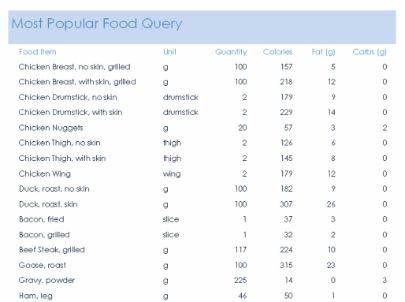
| Eat Well ReportsThe Eat Well Reports were designed to help encourage the Eat Well Challenge, which aims to help students improve their diet and lifestyle. One of the methods it suggests to do this is eating a varied and balanced diet. Hence, I produced reports for my most popular and least popular food groups - this data was collected using my questionnaire.The reports were created in Microsoft Access, as this application is a dedicated database and report application. The reports were created using the queries. After this, I edited the reports to make them appeal more to the viewer and increase readability.The colours have been made more interesting to appeal to the teenage audience however the overall appearance of the reports still has a professional ambiance. In future, in order to improve, perhaps more interesting and vibrant colours may be used. |

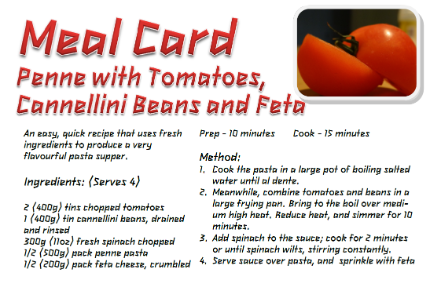
| Meal Card One of our publications we had to produce was a set of meal cards. The purpose of these meal cards is to encourage students to "try new things", to hopefully aid the challenge of Eat Well. The Meal card gave information regarding the recipe (ingredients and method) for the main meal provided to the candidate/student. Trying new things was encouraged by choosing ingredients that came from the least popular food types. The recipes I chose were Penne with Tomatoes, Cannellini Beans and Feta, and for my dessert, Eton Mess. Both of these chosen recipes are very tasty, nutritious and fulfil the objective of the task. The information I put on the meal card included the name, a
short description, ingredients, costs, times and skill level, and
finally pictures of the ingredients and finished product images. For my
first set of images i was given feedback that the images were
unsuitable, so i followed up on this advice and re-did them. |
| Information Point Another task we had to complete was the production of an Information Point. This had to be produced in order to introduce a certain Olympic Value and the SmallSteps4Life programme. It also had to encourage students to want to take up a challenge, and therefore it had to be motivational and inspiring. In order to achieve this goal, I have added a fast-paced and exciting soundtrack to the Information Point, the Wimbledon TV Theme Song to be precise. I began my Information Point on Microsoft PowerPoint 2003, as it was the easiest way, in my opinion, to make a quick and simple but effective information source. The colour blue has been used a lot across my entire DiDA project, due to the colour being one of the colours of the Olympic Rings, so therefore the text is mainly blue. Blue is also a cheerful colour, which means it will be seen as inspirational and motivational for the candidates challenge. Download the zip file, extract it and run the .pptx file. The reason this presentation is in a compressed .zip format is because the presentation includes music timed to events on the screen, and in order for the music file to be included with the presentation, the PowerPoint presentation had to be packaged in some way. A .zip archive seemed to be the best way to do this. If the zip file can't be viewed using the Moderator's toolkit, a .pptx file has been included which won't include the music. |


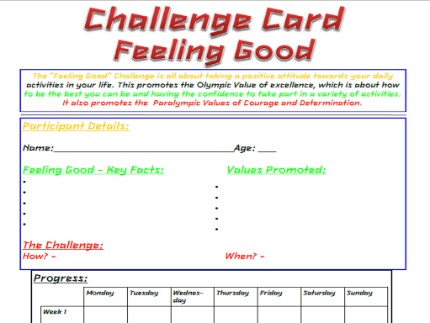
| Challenge Card Another document which needed to be produced was the Challenge Card - it's purpose to aid students in keeping track and recording progress during the four weeks they will be undertaking their challenge; either Get Active, Eat Well, or Feel Good. The card had to include space to record:
...and also one relevant image, complete with caption. I produced the document in Microsoft Publisher 2010, as I felt this was the most appropriate application considering the Challenge Card would later be “published” to the students undertaking the challenge; in this case, Feeling Good. I started off by adding the title, using the prestigious London Olympics 2012 font (which is actually used throughout the entire document and generally my DiDA project) and then wrote a short description on the challenge. This description briefly summarised what the challenge involved and what the challenge was all about – including a mention of which Olympic Values it represents. I then created a large box, and began designing the lines and bullet points where the students would write in the necessary information that applied to them. Underneath this, I created a large table of “Progress” where the students would be able to note down and record their progress across the span of the four weeks of the challenge. Located at the very bottom, I have added a small image of a man stood on a hill with his arms in the air and the sun behind him, captioned “He feels good!!!”, adding to the Feel Good feeling the document is designed to bring to the students. The colours I chose are heavily linked with the Olympic Rings, using the colours Blue, Yellow, Black, Green and Red. I believe I have included all necessary requirements, as stated on the DiDA Project Brief Website. If I were to reproduce this document, I feel that the only thing I would change would be to perhaps have 2 versions. One document would be much more colourful and have more pictures in order to make the document a little more fun for the younger ages. The second version would be more grown up and professional for much older ages. Expanding on the 2 versions concept, another idea could be to have a Male version and a Female version of the document, achieved by customizing the colour schemes, images, and writing in the description. |
